
Anyone who has built a gaming PC keeps a mental list of the things that can kill it, and almost everything on that list is a component. The thing that actually got me, twice, was the wall.
Two separate power failures yanked my machine off mid-session, and both times I spent the next day poking at files and wondering what had quietly corrupted itself. So I went shopping for a UPS, which turned into a longer and dumber story than I expected.
The 600VA mistake that taught me the difference between VA and watts
My first attempt was a 600VA unit off Amazon that looked perfectly reasonable in the listing and cost almost nothing. I plugged everything in, all the lights came on, and for browsing and writing it worked exactly as advertised.
Then I launched a game and it started beeping. Not a polite one-time chirp either, but a constant overload alarm that ran the entire session, and it did the same thing the second I opened a video project.
That beeping was not a defect. It was the UPS telling me that the load I had hung on it was more than its battery could actually carry if the power went out.
Here is the part the box does not explain well: VA and watts are not the same number. A 600VA unit usually works out to somewhere around 330 to 360 real watts, and a modern graphics card can eat most of that on its own before the CPU, monitor and everything else gets a turn.
So it was doing its job, technically. It was also completely useless for the one reason I bought it.
What you actually get for around $200
I asked around on Reddit and in a Discord I hang out in, and the answer came back the same every time: the CyberPower LX1500GU3-FC. My local computer shop said the same thing without prompting, which is usually a good sign, and it happened to be on sale for about $50 off the $199.99 list price.
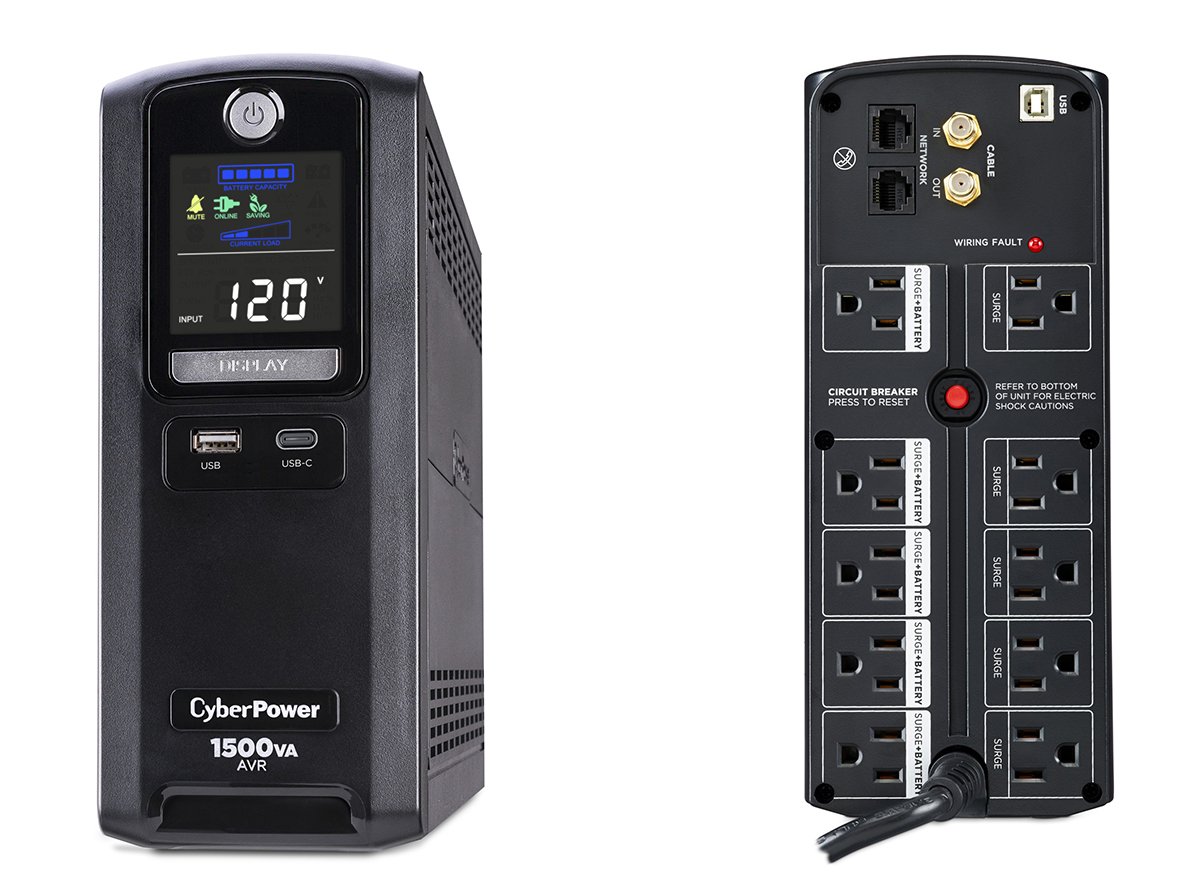
The headline number is 1500VA / 900W, roughly triple the useful capacity of the unit I was replacing. It’s a line interactive design with AVR, so it corrects small voltage sags and surges on its own without touching the battery, which is better for battery life than it sounds.
You get 10 outlets split down the middle: five with battery backup plus surge protection, and five surge only. Two are widely spaced for wall bricks, which is one of those small design choices you only appreciate after years of fighting a power strip.
There’s 890 joules of surge suppression, RJ45 pass-through for ethernet, coax protection for cable, and two USB charging ports (one USB-A, one USB-C, sharing 20W). Add a three-year warranty that covers the batteries and a $500,000 connected equipment guarantee, and the sale price stopped feeling like a splurge.
Big, heavy, and easy to forget about
It’s a mini tower, about 3.9 x 9.8 x 13.7 inches, and it weighs 25 pounds because there are two sealed lead-acid batteries inside. The weight is genuinely startling the first time you pick up the box.
In practice it tucks behind my desk and I never think about it, which is the highest compliment you can pay a UPS.
The one setup decision that actually matters is which outlets get what. Anything that needs to survive an outage goes on the battery side, and everything else goes on surge only, because that split is what keeps you from burning runtime on things that don’t need it.
I’ve got the PC, monitor, speakers and an inkjet printer on the battery side. An inkjet idles at almost nothing so it costs me very little, but a laser printer should never go on a battery outlet, since the fuser pulls enough on warm-up to trip the overload alarm by itself.
The display is the feature I didn’t know I wanted
The color LCD on the front shows your live load in watts, which after the 600VA fiasco is easily the most useful thing on the unit. It turns “am I overloading this?” into a number you can read from across the room.
My system is an RTX 4080 Super paired with an AMD Ryzen 9 9900X, fed by a Corsair SF850. With that plus the monitor, speakers and printer all connected, the panel sits right around the halfway mark when I’m gaming or pushing through a video render.
Roughly half of 900W. That’s a figure I could not have confidently worked out on my own, and now I don’t have to.
CyberPower also offers PowerPanel Personal software over the USB connection, which logs power events and can shut Windows, Mac or Linux down automatically when the battery runs low. I never installed it, because what I wanted was a box I plug things into, and the screen already tells me everything I care about.
Two minutes, fourteen minutes, and what happened during the real outage
Rated runtime is 14 minutes at half load and 2 minutes at full load. Sitting near half, I’m realistically looking at ten minutes or so, which is a save your work and shut down properly window rather than a keep playing window.
Set your expectations there. A UPS at this price is an undo button for the wall socket, not a generator.
My one real test came a couple of months in, when the power went out across the whole area. My PC did not so much as flicker, and the UPS started its alarm to let me know I was running on battery.
Before I could even start closing things down, the power came back and it went quiet. Total elapsed drama: a few seconds, nothing lost, and a machine that never knew anything had happened.
The transfer time is rated at 4ms, and that matches what I saw. Nothing on the desk registered the handoff.
One thing worth knowing: recharging takes around eight hours from empty. If your area gets outages in clusters, you may not be back at full capacity when the second one lands.
Simulated sine wave, and whether that should worry you
Here’s the real caveat, and it’s the reason this unit costs what it does instead of more. The LX1500GU3-FC puts out a simulated sine wave on battery, which is a stepped approximation rather than the smooth curve coming out of your wall.
Most active PFC power supplies, which covers basically every decent PC PSU sold today, handle that without complaint. A few don’t, and the failure mode is nasty: the PSU shuts off or clicks audibly at the exact instant the UPS switches to battery, which defeats the entire point of owning one.
My Corsair SF850 is an ATX 3.1 unit with active PFC and it hasn’t so much as twitched, including during the actual outage. That’s one data point, but it’s a modern high-end PSU on a modern high-end system, which is probably the case most readers here care about.
If you want that risk off the table entirely, CyberPower’s PFC Sinewave line does true sine wave output for noticeably more money. For most people I’d start with the cheaper unit, since you’ll find out whether your PSU objects within about four milliseconds of your first outage.

What I’d change
I have no actual complaints after a couple of months, which is boring to write but honest. A few things are still worth knowing before you buy.
The sealed lead-acid batteries are a consumable, typically good for something like three to five years before capacity starts sliding. The good news is they’re user replaceable (the part number is RB1290X2), so a dying battery doesn’t mean throwing out the whole unit.
20W of shared USB charging is fine for topping up a phone and thin for anything more demanding in 2026. And while ten outlets sounds generous on the box, remember that only five of them are actually on battery.
The verdict
This is more UPS than I strictly need, and I’d buy it again tomorrow. Running at half capacity means the battery is never stressed, the electronics stay cool, and there’s room for a future GPU that draws more than this one does.
There’s also real value in not having to be good at power math. I couldn’t confidently calculate my own draw beforehand, and buying with headroom meant that ignorance cost me nothing.
At about $150 on sale it was an easy yes. At the full $199.99 I’d still recommend it to anyone running a current generation gaming or content creation rig, because that’s exactly the load profile that turns budget UPS units into expensive beeping paperweights.
If your setup is a laptop and a router, this is far too much unit and you should buy something smaller and cheaper. But if there’s a high-end GPU in the picture, skip the step I wasted money on and buy the right one the first time.
–
Images are from the Cyber Power website and used under Fair Use.
Want to start your own blog, a personal website or something for your small business or side hustle? Site Ground is the absolute best web hosting company out there
You Might Also Like...
Mouse Polling Rate 1000 vs 2000 vs 8000 Explained (What It Really Changes, and What to Use)

Mouse polling rate is one of those settings that sounds insanely importan (like flipping from 1000 Hz to 8000 Hz should instantly turn you into an esports god) but in real life it’s more nuanced. If…
How to Force Borderless Fullscreen in PC Games (Every Method That Actually Works)
If you've ever tried to alt-tab out of a PC game and watched your screen freak out for a solid five seconds, you already know why borderless fullscreen mode exists. It's the sweet spot between…
How to Fix Xbox Controller Not Detected on Windows 11
So you've sat down for a gaming session, grabbed your Xbox controller, and… nothing. Windows 11 acts like it doesn't exist. No vibration, no light, no input. Don't worry, you're not alone, and this…
Japanese Rural Life Adventure: Beginner Tips You Need to Know

Japanese Rural Life Adventure has finally made the jump from Apple Arcade to Steam, and if you're a fan of cozy farming sims like Stardew Valley or Harvest Moon, this one absolutely deserves a spot…
Under the Island Tips: The Ultimate Beginner’s Guide to Seashell Island
If you're just stepping onto Seashell Island for the first time, you're in for a treat. Under the Island is a 2D top-down action-adventure that wears its classic Zelda inspiration proudly, mixing…
Retrace the Light Tips: A Beginner’s Guide With Puzzle, Combat, and Exploration Tricks

If you’re looking for Retrace the Light tips or a quick beginner’s guide to Retrace the Light, the biggest thing to know is this: the game is built around a mindset shift. It’s not just “solve…
18 Indie Games that are Better than Most AAA Major Releases
Last updated December 31, 2025. There's been a massive explosion of amazing indie games in recent years. Having an alternative to the massive AAA games is always a good thing and many of these indie…
All Unicorn Overlord Characters: Recruitment Guide, Builds, and Missables
This master post rounds up every recruitable character in Unicorn Overlord, with an alphabetical list linked to a detailed guide for each character. You’ll also find practical tips on recruiting,…
The Top 10 Nintendo 64 Games You Need to Play
The Nintendo 64 launched after the Super Nintendo in 1996 and was Nintendo's first console with fully 3D 64-bit graphics. It's one of the most famous and well-recognized systems in videogame history,…
Golden Sun Djinn Guide and Djinn Location Guide
The Djinn system in the Game Boy Advance classic, Golden Sun, introduces a novel and intricate layer to the traditional RPG formula, setting it apart from its contemporaries. This system not only…
The Top 10 Super Nintendo Games You Still Need to Play
The Super Nintendo Entertainment System (SNES) is a legendary video game console that holds a special place in the hearts of gamers around the world. Released by Nintendo in 1990 (in Japan) and 1991…