
There was a stretch of my life where I printed something almost every day. High school essays, then university readings, then more essays, then lab sheets I definitely should have started earlier.
The family printer handled all of it. I knew its noises the way you know a car you grew up riding in.
Then I graduated and that whole habit just stopped. My printing needs fell off a cliff and my actual printer never got the memo.
I went from printing constantly to printing almost never
These days I can go a full month without printing a single page. Sometimes a lot longer than that.
When I finally do need it, it’s one document or a return shipping label. That’s the entire list.
I have never once needed anything fancy. I have never needed color.
If you’re anything like me, you already know the problem this creates.
My inkjet slowly turned into a paperweight
I had an inkjet for years. The color ink ran out ages ago and I never bothered replacing it, since I only ever printed in black and white anyway.
That should have been fine. It really wasn’t.
Printing that rarely meant the black cartridge dried out between uses, every single time. Ink sitting still in a nozzle for six weeks does not stay liquid.
So the routine became this. Need to print one page, discover the printer can’t, run a head cleaning cycle, run it again, run it a third time.
Sometimes I’d get something barely readable out the other end. Sometimes I’d give up and buy a whole new cartridge to print a single sheet of paper.
It’s a small frustration on paper. It’s the kind that stacks up into real resentment.
Why a black and white laser was the obvious fix
Then I came across the M140w and had one of those moments where an idea just clicks.
Toner is a dry powder. It doesn’t dry out sitting unused for two months, because there’s nothing in it left to dry.
That one difference erases my entire problem. Lasers are also faster, cheaper per page, and steadier over the long run than inkjets.
The catch has always been price, because a laser normally costs more up front. That’s where this thing gets clever.
HP took color out completely, which I never wanted, and got the price down to somewhere around $139 to $159 depending on where you look. It lists at $209 but I’d be surprised if you paid that.
It’s a printer built for one very specific kind of person, and that person turned out to be me.

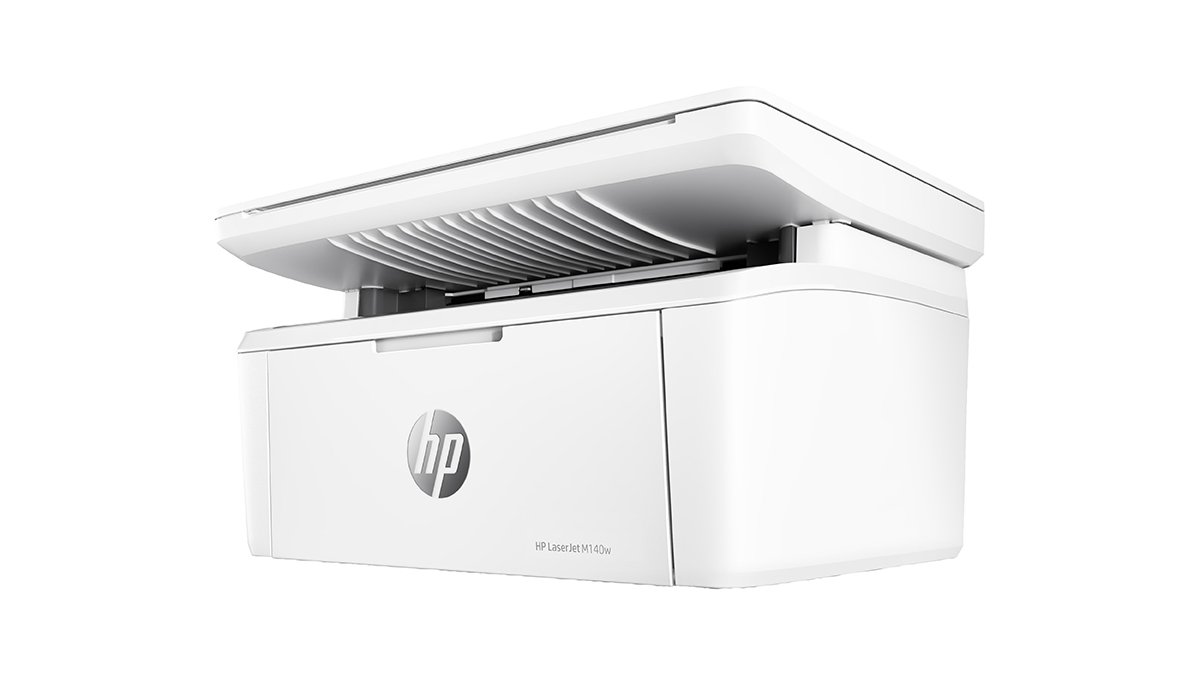
It really is small, with one asterisk
Closed up, it’s about 14.2 x 10.4 x 7.8 inches and it weighs under 12 pounds. I can pick it up with one hand and move it without thinking about it.
Here’s the asterisk. The paper tray extends out the front when you load it, and that pushes the depth to roughly 16.8 inches.
So it needs more shelf than the product photos suggest. Still small, just not quite as small as it looks online.
Setting it up and how it prints
Setup was painless for me. On the plain M140w you can skip the HP Smart app entirely if you install the full driver package from HP’s support site, which is what I’d recommend doing.
Wi-Fi is 2.4 GHz only, so there’s no 5 GHz support. Mine has been steady, though I’ll be honest that dropped connections are one of the more common complaints you’ll find about this printer.
You get AirPrint, Mopria, Wi-Fi Direct, a USB port and an ethernet port but no ethernet cable.
It prints up to 21 pages per minute at 600 x 600 dpi, and the first page lands in about eight seconds. For my usage that’s absurd overkill and I love it.
Text quality is genuinely sharp. Documents and labels come out crisp and dark with no streaking.
Graphics are the weak spot. Photos and heavy images come out flat and a little blotchy, so treat this as a text machine and you’ll be happy.
The tray holds 150 sheets, which is small but honestly more paper than I’ll get through in a year.
The scanner is the part I actually use
Here’s the thing I didn’t expect. I use the scanner far more than the printer.
I’ve been steadily digitizing all my important paperwork. Receipts, warranties, tax documents, anything I don’t want to lose in a move.
I scan straight into Photoshop through the WIA device menu, which means I never have to open HP’s software at all. It shows up as a device, I hit scan, the file appears.
It’s a flatbed with 600 ppi optical resolution and no automatic document feeder. Multi-page documents mean lifting the lid and swapping sheets by hand.
Would I use it to scan photos or anything needing real detail? No, and I wouldn’t pretend otherwise.
But for receipts and paperwork, which is what I’m doing basically every week, it works great. Fast, clean, legible, and I’ve never had it choke on anything.

What you should know before you buy
There’s no automatic two-sided printing. If you want double sided pages you’re flipping them yourself.
There’s no document feeder either, which pairs with that first point to make this a bad pick for anyone processing stacks of paper.
Toner is the real cost to watch. The HP 141A cartridge is rated at 950 pages and runs roughly $62 to $66, which works out to about 6.5 cents per page.
That’s expensive for a laser printer. It stings less when you print forty pages a year, but it’s worth going in with your eyes open.
The cartridge in the box is a starter cartridge, and HP’s own documentation isn’t consistent about the yield. Plenty of owners report it running dry after a couple hundred pages, so budget for a replacement sooner than the spec sheet implies.
HP also uses dynamic security on this model, meaning it blocks cartridges without an accepted HP chip and firmware updates can change what works. Third party toner is much cheaper, but it’s not a guarantee.
I’m still on the original cartridge, so none of this has bitten me yet. I’d rather tell you about it now than have you find out later.
Is the HP LaserJet MFP M140w worth it?
It depends entirely on how much you print, and I mean that as actual advice rather than a dodge.
If you print regularly, this isn’t your printer. Something like the Brother DCP-L2640DW costs a bit more but gives you automatic duplex, a document feeder, a bigger tray, and toner that lands closer to two cents a page.
At any real volume that toner gap swallows the money you saved up front. It’s not close.
But that’s not the person this thing is for. It’s for the rest of us, the people who print a shipping label in March and a form in July and nothing in between.
For that, it’s been quietly excellent. I’ve never walked up to it and found it unable to print, which is a sentence I could not say about any inkjet I’ve owned.
The scanner turning out to be the part I lean on hardest was a bonus I didn’t plan for. It’s earned its spot on the shelf twice over.
Mostly what I feel about the HP Laserjet MFP M140w is relief. I stopped thinking about printing, and after years of head cleaning cycles and wasted cartridges, that’s the nicest thing I can say about it.
–
Images are from the HP website and used under Fair Use.
Want to start your own blog, a personal website or something for your small business or side hustle? Site Ground is the absolute best web hosting company out there
You Might Also Like...
Mouse Polling Rate 1000 vs 2000 vs 8000 Explained (What It Really Changes, and What to Use)

Mouse polling rate is one of those settings that sounds insanely importan (like flipping from 1000 Hz to 8000 Hz should instantly turn you into an esports god) but in real life it’s more nuanced. If…
How to Force Borderless Fullscreen in PC Games (Every Method That Actually Works)
If you've ever tried to alt-tab out of a PC game and watched your screen freak out for a solid five seconds, you already know why borderless fullscreen mode exists. It's the sweet spot between…
How to Fix Xbox Controller Not Detected on Windows 11
So you've sat down for a gaming session, grabbed your Xbox controller, and… nothing. Windows 11 acts like it doesn't exist. No vibration, no light, no input. Don't worry, you're not alone, and this…
Japanese Rural Life Adventure: Beginner Tips You Need to Know

Japanese Rural Life Adventure has finally made the jump from Apple Arcade to Steam, and if you're a fan of cozy farming sims like Stardew Valley or Harvest Moon, this one absolutely deserves a spot…
Under the Island Tips: The Ultimate Beginner’s Guide to Seashell Island
If you're just stepping onto Seashell Island for the first time, you're in for a treat. Under the Island is a 2D top-down action-adventure that wears its classic Zelda inspiration proudly, mixing…
Retrace the Light Tips: A Beginner’s Guide With Puzzle, Combat, and Exploration Tricks

If you’re looking for Retrace the Light tips or a quick beginner’s guide to Retrace the Light, the biggest thing to know is this: the game is built around a mindset shift. It’s not just “solve…
18 Indie Games that are Better than Most AAA Major Releases
Last updated December 31, 2025. There's been a massive explosion of amazing indie games in recent years. Having an alternative to the massive AAA games is always a good thing and many of these indie…
All Unicorn Overlord Characters: Recruitment Guide, Builds, and Missables
This master post rounds up every recruitable character in Unicorn Overlord, with an alphabetical list linked to a detailed guide for each character. You’ll also find practical tips on recruiting,…
The Top 10 Nintendo 64 Games You Need to Play
The Nintendo 64 launched after the Super Nintendo in 1996 and was Nintendo's first console with fully 3D 64-bit graphics. It's one of the most famous and well-recognized systems in videogame history,…
Golden Sun Djinn Guide and Djinn Location Guide
The Djinn system in the Game Boy Advance classic, Golden Sun, introduces a novel and intricate layer to the traditional RPG formula, setting it apart from its contemporaries. This system not only…
The Top 10 Super Nintendo Games You Still Need to Play
The Super Nintendo Entertainment System (SNES) is a legendary video game console that holds a special place in the hearts of gamers around the world. Released by Nintendo in 1990 (in Japan) and 1991…