
When I was little, I tried to befriend every animal in every game I played. I once followed a Cucco around Kakariko Village for a whole afternoon, hoping it would decide to come home with me.
Most games said no. Wildaria says yes to all of them.
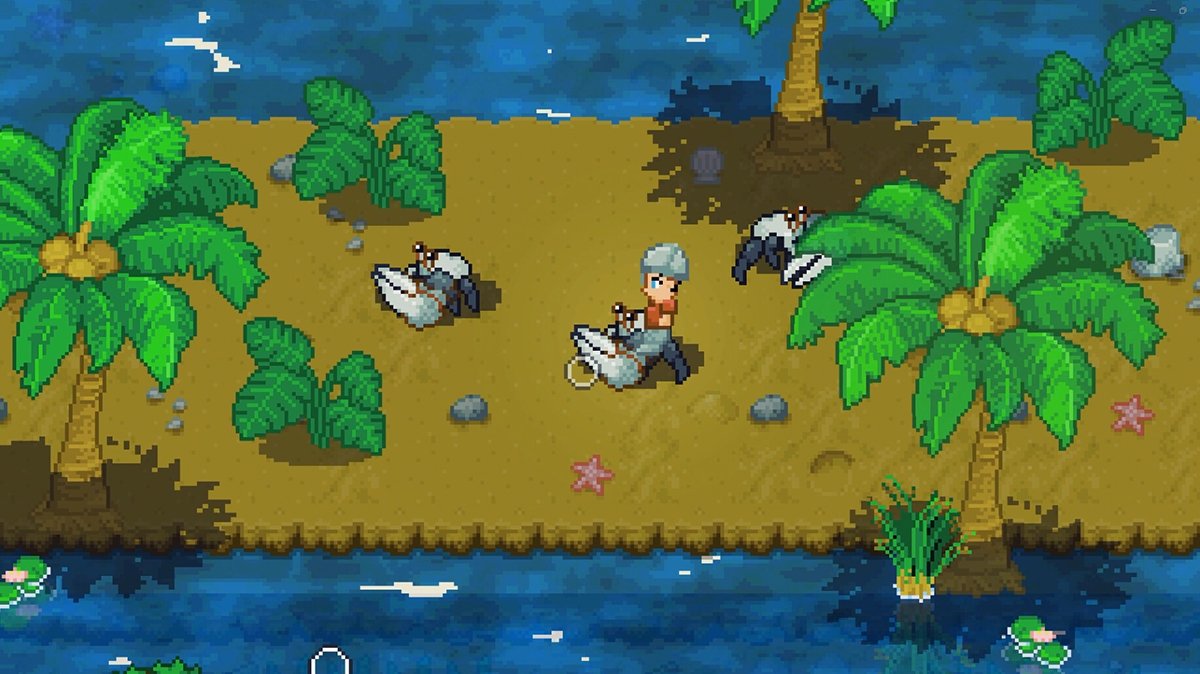
It’s a pixel-art adventure where any creature you meet can become your pet, your ride and your fighting partner. It launched into Early Access on Steam on October 8, 2026 for Windows and Mac, and it comes from SpaceFudge, a mostly solo developer who has been building it for more than five years.
It’s also a game that explains very little. Here are 14 things that will make your first few hours a lot gentler.

What is Wildaria about?
You make a little hero from one of five fantasy species, then head out into an endless, randomly generated world. Right now that world has 4 biomes, more than 40 creatures to tame and 3 main bosses.
The look is pure Game Boy Advance. If you loved Pokemon Emerald or The Minish Cap, the grass and the tiny villages will feel like coming home.
Think of it as Pokemon where you do the fighting too, with a Zelda-style sword in your hand. There are no hunger meters or base chores, so it’s a much calmer time than Palworld.
If that old handheld feeling is your thing, I felt it in Draco and the Seven Scales too.

1. Take your time in the starting area
The game opens in a small tutorial area, and leaving it teleports you into the main world. It’s easy to walk out before you’ve seen everything.
You’ll tame a piglet first, then a little acorn-looking creature. A third, glowing pet can cut down trees, and you need it to reach the last part of the area.
There’s also a shrine here with a riddle on it. Have a go at it before you leave, because it teaches you something you’ll use again later.
2. The Wisdom Spore is right click
Early on, the game hands you a Wisdom Spore and tells you to consume it. At launch, the button prompt on mouse and keyboard was simply blank.
Hold the spore and press the right mouse button. I’d have stood there for ten minutes otherwise, trust me.

3. Learn the lasso before you chase the rare stuff
Taming is a skill here. You throw a lasso and play a tension mini-game, a bit like reeling in a fish in Stardew Valley.
Practice on the easy animals near the start. Every failed throw on a rare creature costs you a lasso, and those are precious early on.

4. Don’t run out of lassos
Lassos get used up, and the game never tells you where to find more. The answer is the Wizard, who sells them in towns to the east.
Some pet shop owners sell special lassos too. You’ll also find them in chests and as drops from enemies, so open everything.
My advice is to buy a small stack as soon as you find the Wizard. Running out right as something adorable wanders past is heartbreaking.

5. Ride everywhere
Your pet is more than a pal. You can ride it, and it’s far faster than walking across an endless map.
Pets also fight beside you, with their own elemental abilities and their own skill trees. A sturdy pet that can soak up hits makes every fight easier.

6. The world gets harder the farther you go
Enemies don’t level up with you. They get stronger the farther you travel from where you started.
If things feel scary, turn around and spend a while closer to home. If things feel too easy, pick a direction and keep riding.
I love this, because it means you set the difficulty just by choosing where to wander.

7. You can’t ruin your build
Do you freeze up at skill trees? I do, every single time.
Here you can relax. There’s no level cap for you, your pets or the skills themselves, so you can keep adding points forever.
Each extra point gives a little less than the one before. That’s a gentle push to spread out and try things, like faster pet riding or more health.
8. Gear is rare on purpose
You won’t be showered with swords and armor. Drops were turned down on purpose, so a new piece of gear feels like a small event.
Hold on to what you find and upgrade it at a forge when you can. Don’t worry if you’re still wearing your starter outfit a few hours in.

9. Use the bank, and learn the quick-move button
Towns have a banker who stores your extra items. It’s worth a visit before your bag fills up with treats and trinkets.
On a controller, press the left trigger on an item to send it straight to the other inventory. The menus are a little fiddly on controller right now, so this saves a lot of scrolling.

10. Take quests one at a time
Town leaders will keep handing you quests for as long as you keep asking. At launch, stacking up several from the same leader could leave some that wouldn’t complete.
So take one, finish it and come back. In your quest log there’s a “show on map” option that points you to the right dungeon, ruin or mountain.

11. Play Trailsweeper when you need coins
Some towns have a board game called Trailsweeper. You can bet a few coins on it with the locals.
It’s a calm way to earn money when you need a break from fighting. Think of it as your fishing mini-game for now, since real fishing is only a maybe for later.

12. Read the riddle at animal shrines
Out in the world you’ll find animal shrines with an offering plate. Each plate has a riddle engraved on it.
The answer is a food offering. Here’s the catch: it isn’t simply that animal’s favorite snack, so read the words carefully.
I won’t spoil any of them. Solving one on your own is a lovely little moment.

13. Nature or civilization?
The main quest asks you to pick a side. You can protect nature from the mana drills, or help civilization by slaying the Animal Gods.
Your choice leads to different boss fights. The story is still being built during Early Access, so follow your heart and don’t stress about getting it “right.”
You can guess which side I picked. I came here to pet the animals.
14. Early Access quirks worth knowing
If your whole screen goes bare, you pressed F1. It hides the HUD for screenshots, and pressing it again brings everything back.
If you start a second character, make a new world for them too. Reusing an old world at launch could stop that third tutorial pet from showing up.
Steam Deck players had some trouble getting out of the tutorial in the first few days. The developer is patching every week, so it’s worth checking the latest notes before you play handheld.
The game is single-player and English only for now. Multiplayer, more languages, more pets and a cooking system are all planned.

How Wildaria feels
There’s a moment, a little way in, when you climb onto a creature you caught yourself and point it at the horizon. Nobody tells you where to go.
That’s the feeling I keep coming back to. It reminded me of being a kid with a brand new cartridge and a whole Saturday ahead of me.
It’s rough around the edges, and it will be for a while. But it’s made with so much obvious love that I found the rough bits easy to forgive.
If you want another gentle adventure after this, TOEM 2 is a sweet one. And if you’d like something that only looks cozy, Sephiria fooled me completely.
You can find more small games like this in my September indie roundup. Now go find that piglet.
–
Images in this article are from the Wildaria page on Steam and used under Fair Use.
Want to start your own blog, a personal website or something for your small business or side hustle? Site Ground is the absolute best web hosting company out there
You Might Also Like...
Mouse Polling Rate 1000 vs 2000 vs 8000 Explained (What It Really Changes, and What to Use)

Mouse polling rate is one of those settings that sounds insanely importan (like flipping from 1000 Hz to 8000 Hz should instantly turn you into an esports god) but in real life it’s more nuanced. If…
How to Force Borderless Fullscreen in PC Games (Every Method That Actually Works)
If you've ever tried to alt-tab out of a PC game and watched your screen freak out for a solid five seconds, you already know why borderless fullscreen mode exists. It's the sweet spot between…
How to Fix Xbox Controller Not Detected on Windows 11
So you've sat down for a gaming session, grabbed your Xbox controller, and… nothing. Windows 11 acts like it doesn't exist. No vibration, no light, no input. Don't worry, you're not alone, and this…
Japanese Rural Life Adventure: Beginner Tips You Need to Know

Japanese Rural Life Adventure has finally made the jump from Apple Arcade to Steam, and if you're a fan of cozy farming sims like Stardew Valley or Harvest Moon, this one absolutely deserves a spot…
Under the Island Tips: The Ultimate Beginner’s Guide to Seashell Island
If you're just stepping onto Seashell Island for the first time, you're in for a treat. Under the Island is a 2D top-down action-adventure that wears its classic Zelda inspiration proudly, mixing…
Retrace the Light Tips: A Beginner’s Guide With Puzzle, Combat, and Exploration Tricks

If you’re looking for Retrace the Light tips or a quick beginner’s guide to Retrace the Light, the biggest thing to know is this: the game is built around a mindset shift. It’s not just “solve…
18 Indie Games that are Better than Most AAA Major Releases
Last updated December 31, 2025. There's been a massive explosion of amazing indie games in recent years. Having an alternative to the massive AAA games is always a good thing and many of these indie…
All Unicorn Overlord Characters: Recruitment Guide, Builds, and Missables
This master post rounds up every recruitable character in Unicorn Overlord, with an alphabetical list linked to a detailed guide for each character. You’ll also find practical tips on recruiting,…
The Top 10 Nintendo 64 Games You Need to Play
The Nintendo 64 launched after the Super Nintendo in 1996 and was Nintendo's first console with fully 3D 64-bit graphics. It's one of the most famous and well-recognized systems in videogame history,…
Golden Sun Djinn Guide and Djinn Location Guide
The Djinn system in the Game Boy Advance classic, Golden Sun, introduces a novel and intricate layer to the traditional RPG formula, setting it apart from its contemporaries. This system not only…
The Top 10 Super Nintendo Games You Still Need to Play
The Super Nintendo Entertainment System (SNES) is a legendary video game console that holds a special place in the hearts of gamers around the world. Released by Nintendo in 1990 (in Japan) and 1991…